Turn the recordings you already have into text
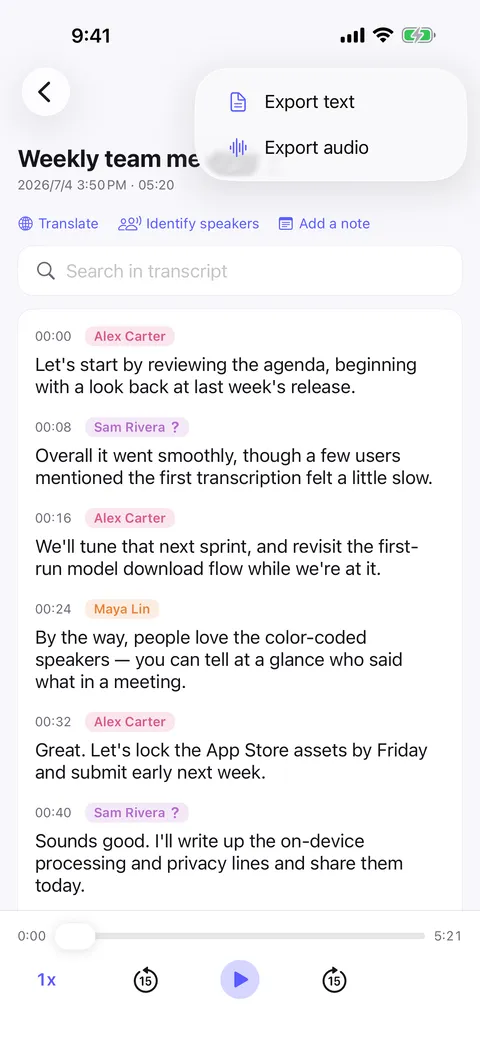
A voice memo, a meeting somebody else recorded, a lecture, a video file. Import it into Murmur and get a transcript on your own device, with every speaker labeled and every line replayable.


The recording was never the problem — reading it is
A folder of voice memos is an archive nobody opens. Scrubbing through an hour of audio for one sentence costs more than the sentence is worth, and the usual fix — uploading the file to a transcription service — hands your recording to somebody else.
- Audio and video, both
- Import an audio or a video file from your device and Murmur transcribes the speech in it, detecting the spoken language automatically.
- Imported files get speaker labels too
- Files you bring in are treated exactly like recordings made in the app: each line carries the person who said it, color-coded.
- Nothing is uploaded to transcribe it
- The speech model runs on your phone. There is no queue, no account, and no “processing on our servers” screen between you and the text.
- Searchable, replayable, exportable
- Full-text search across the transcript, tap any line to hear just that sentence, and export as Plain text, Markdown, PDF or Word.
How it goes
Start to finish
- 01
Import the audio or video file you already have on the device.
- 02
Murmur detects the spoken language and transcribes it on-device.
- 03
The voices are separated — name anyone new once and they are remembered.
- 04
Search it, replay a line, translate it, or export the transcript.
FAQ
Audio file transcription — common questions
Which files can I import?
Is the file uploaded to be transcribed?
Does speaker identification work on imported audio?
Can I transcribe a file in another language?
Start with your next conversation.
Download Murmur, download a speech model once, and every recording after that is transcribed on your own device — meetings, interviews, lectures, ideas on a walk.
Free to download · No account · Works with no signal
The free version transcribes the first 20 minutes of each recording on iPhone, iPad and Android; Murmur Pro is a one-time purchase that lifts the limit.