Learn a language one sentence at a time
Real speech, written down and translated, with a replay button on every sentence. Import the audio you actually want to understand and work through it line by line.


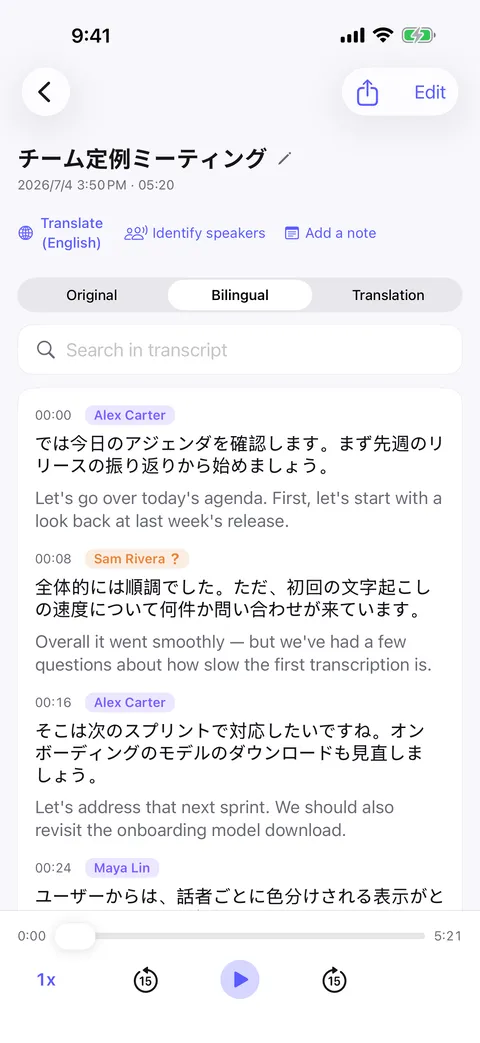
Textbook audio is not how people talk
The gap between a course recording and a real conversation is enormous — but real audio is unusable for study until you can see the words and hear one sentence at a time.
- Bring your own material
- Import a podcast, a speech, a film clip or a recording of a conversation you had.
- Read what you hear
- An on-device transcript with timestamps, so you can see the sentence you just failed to catch.
- Original and translation, side by side
- Translate line by line and read bilingually — or hide the translation and test yourself.
- Shadow a single sentence
- Tap a line to replay just that sentence, as many times as you need.
How it goes
Start to finish
- 01
Import the audio or video you want to study, or record a conversation.
- 02
Murmur transcribes it on-device and detects the language.
- 03
Translate the transcript and switch between bilingual and translation-only.
- 04
Tap any sentence to replay and repeat it.
FAQ
Language learning — common questions
Which languages does it support?
Does the translation happen on my device?
Can I use my own podcasts?
Does it work on a plane or the metro?
Start with your next conversation.
Download Murmur, download a speech model once, and every recording after that is transcribed on your own device — meetings, interviews, lectures, ideas on a walk.
Free to download · No account · Works with no signal
The free version transcribes the first 20 minutes of each recording on iPhone, iPad and Android; Murmur Pro is a one-time purchase that lifts the limit.