Meeting transcription that knows who said what
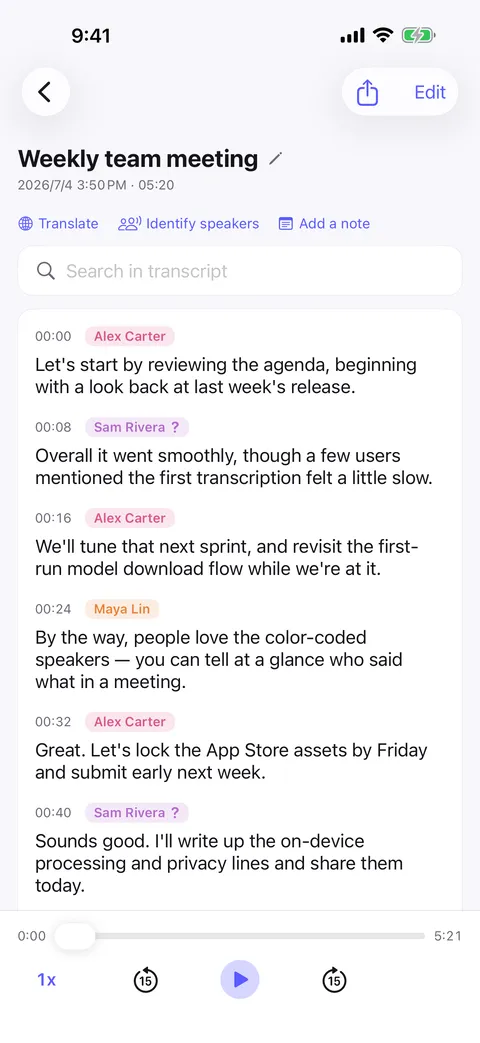
Put the phone on the table, hit record, and stay in the conversation. Murmur writes the meeting down as it happens and labels every line with the person who said it — on your device, without sending the room to anyone else.


The problem with taking notes in a meeting
The person taking notes is the person not participating. And an audio file nobody replays is not a record — a week later, “who agreed to that?” is unanswerable.
- Attribution, not just a wall of text
- Every decision, objection and action item is attached to the person who voiced it, color-coded so a four-person meeting reads like a script.
- People it has met before
- Name your teammates once. Murmur recognizes those voices in next week’s meeting automatically.
- Confidential by default
- Client calls, salary conversations, board discussions — the audio and the transcript never leave the device, so there is no vendor to vet.
- Straight into your workflow
- Export as Plain text, Markdown, PDF, Word and drop it into your notes, an email, or an AI assistant to produce the summary and action items.
How it goes
Start to finish
- 01
Put your phone on the table and hit record.
- 02
Murmur transcribes on-device and separates the voices as the meeting runs.
- 03
Afterwards, name any unknown speakers once — they are remembered next time.
- 04
Search the transcript, or export it with speaker names for the follow-up email.
FAQ
Meeting transcription — common questions
Do I need Wi-Fi in the meeting room?
Is the meeting audio sent anywhere?
Can it handle several people talking?
Can I get a summary of the meeting?
Start with your next conversation.
Download Murmur, download a speech model once, and every recording after that is transcribed on your own device — meetings, interviews, lectures, ideas on a walk.
Free to download · No account · Works with no signal
The free version transcribes the first 20 minutes of each recording on iPhone, iPad and Android; Murmur Pro is a one-time purchase that lifts the limit.