An offline transcription app that still knows who said what
Download one speech model, then transcribe with the network switched off — on a plane, in a basement meeting room, in a field interview two hours from the nearest tower. Speaker labels, translation and search all work exactly the same.


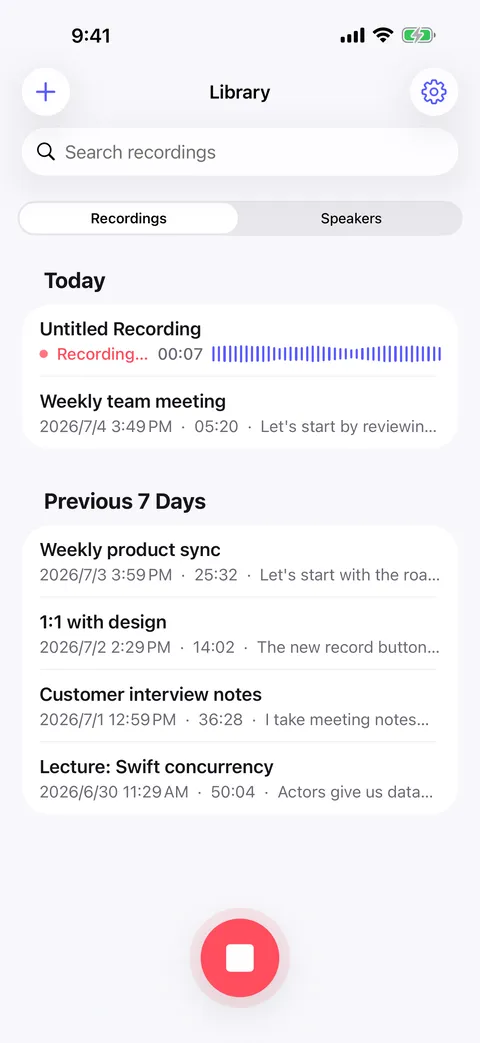
Offline is a consequence here, not a mode
Plenty of apps advertise an offline mode that only queues your recording until the signal comes back; the transcription itself still happens on a server later, and until it does you have an audio file and a spinner. Murmur has nothing to queue. The speech recognition model is downloaded to the device once and runs there from then on, so a recording made in airplane mode is already a finished, searchable, speaker-labeled transcript before you land. The network is used to fetch a model in the first place and to update the app — that is the whole list.
- One download, then nothing
- Pick a speech model once over Wi-Fi. After that, transcription, speaker separation and translation all run locally with the radios off.
- No queue and no processing screen
- The transcript appears as the phone works through the audio. There is no server-side job to wait on and nowhere for your recording to get stuck.
- Planes, basements, fieldwork
- The situations where a recording matters most are often the ones with the worst connectivity. Those are exactly the ones an on-device model is indifferent to.
- Long sessions, without filling the phone
- Recordings keep running in the background, and the audio is compressed automatically after transcription so a term of lectures does not eat your storage.
Side by side
On-device app vs cloud transcription service
| Capability | Murmur (on-device) | Typical cloud service |
|---|---|---|
| Where transcription happens | On your own device | On the provider’s servers |
| Your recording is uploaded | No | Yes — that is how it works |
| Account required | No | Usually |
| Works with no signal | Yes, after a one-time model download | No |
| Speaker labels | On-device, remembered across recordings | Server-side, if the plan includes it |
| Transcript translation | On-device, line by line | Server-side, where offered |
| Transcribe a file you already have | Yes, on-device | Yes, by uploading it |
| Export formats | Plain text, Markdown, PDF, Word | Varies by plan |
| Who else can read the transcript | Nobody unless you share it | You and the provider |
| If the service is down or shuts down | Nothing changes — it all runs locally | You lose access |
What still needs a connection
Two things, both optional and both one-off. Speech models are downloaded from inside the app rather than shipped in it, so the first run needs a network — after that the model is on your device and stays there. And if you turn on iCloud sync it obviously talks to iCloud: your own private iCloud account, syncing your own files between your own devices. Recording, transcription, speaker identification, translation, search and export never touch the network at all.
Offline usually means fewer features. Not here.
The normal trade for working offline is a stripped-down version of the product. An offline transcript in Murmur still carries timestamps, still labels each line with the person who said it, still recognizes people from earlier recordings, still searches, and can still be translated line by line and read next to the original. Nothing degrades when the signal goes, because none of it was reaching for the network in the first place.
What you need to run it
Murmur runs on iPhone, iPad and Android — iOS 18 or later on Apple devices, Android 8.0 or later. A speech model takes up space on the device, so the practical constraint is the storage you are willing to give a recorder, not the connection you happen to have that day. The app is free to download, and none of the on-device work needs an account.
FAQ
Offline transcription app — common questions
Does it really transcribe in airplane mode?
How much has to be downloaded first?
Do speaker labels work offline?
Can I translate a transcript offline?
The other comparisons
On-device vs the cloud
Upload versus on-device: what actually changes when the speech model runs on your phone instead of a data center.
See on-device vs the cloudPrivate transcription app
Why “we do not look at your recordings” and “your recordings never leave the device” are not the same claim.
See private transcription appStart with your next conversation.
Download Murmur, download a speech model once, and every recording after that is transcribed on your own device — meetings, interviews, lectures, ideas on a walk.
Free to download · No account · Works with no signal
The free version transcribes the first 20 minutes of each recording on iPhone, iPad and Android; Murmur Pro is a one-time purchase that lifts the limit.