A private transcription app — by architecture, not by policy
Most privacy claims are promises about what a company will do with data it holds. This one is a statement about where the data is: on your device, transcribed by a model on your device, with no server in the loop and no account attached to any of it.

A promise you have to trust, versus a design you can test
Every hosted transcription service has a privacy policy, and most are written in good faith. But a policy is a commitment about handling data the company already holds: it can be revised, it can be breached, it can be compelled, and it lasts exactly as long as the company does. An app that never transmits the recording is making a different kind of claim — there is nothing at the other end to mishandle, subpoena or leak, because nothing was sent. And you do not have to take our word for it: put the device in airplane mode and watch the transcript appear anyway.
- No account, therefore no profile
- There is no sign-up, no email address and no password. Nothing ties a recording to an identity, because the app has no notion of who you are.
- Voiceprints stay where they were made
- Recognizing the same person across recordings requires a model of their voice. That is biometric data, and it is kept on the device that created it and never uploaded.
- Your iCloud, not our cloud
- iCloud sync is optional and off until you enable it. When it is on, your files sync through your own private iCloud account — we never see it.
- Nothing to vet, nothing to negotiate
- Client calls, clinical conversations, HR meetings, protected sources: no third party is introduced, so there is no vendor to assess and no processing agreement to sign.
Side by side
On-device app vs cloud transcription service
| Capability | Murmur (on-device) | Typical cloud service |
|---|---|---|
| Where transcription happens | On your own device | On the provider’s servers |
| Your recording is uploaded | No | Yes — that is how it works |
| Account required | No | Usually |
| Works with no signal | Yes, after a one-time model download | No |
| Speaker labels | On-device, remembered across recordings | Server-side, if the plan includes it |
| Transcript translation | On-device, line by line | Server-side, where offered |
| Transcribe a file you already have | Yes, on-device | Yes, by uploading it |
| Export formats | Plain text, Markdown, PDF, Word | Varies by plan |
| Who else can read the transcript | Nobody unless you share it | You and the provider |
| If the service is down or shuts down | Nothing changes — it all runs locally | You lose access |
What “on-device” has to mean before it counts
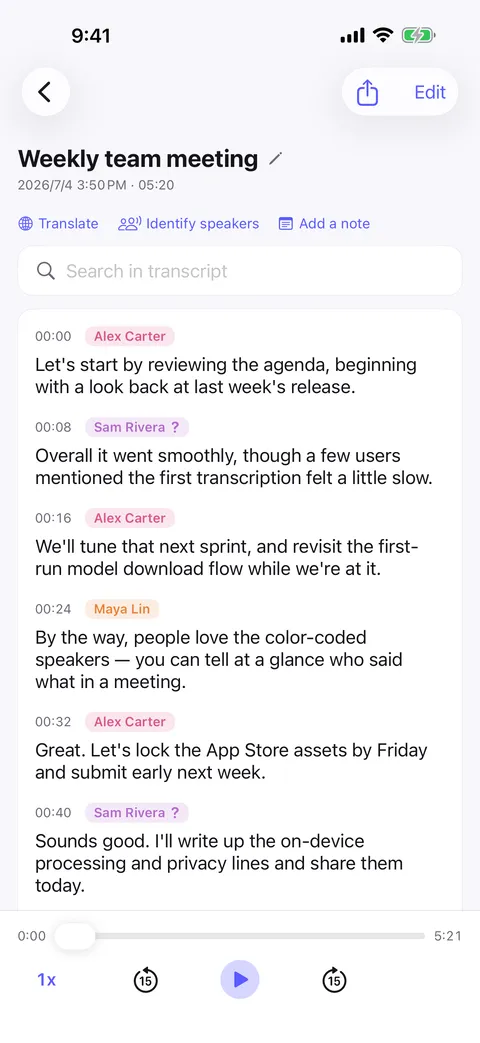
The phrase gets used loosely. Some apps call themselves on-device because the audio is encrypted before it is uploaded, or because one small piece of the work — detecting when somebody is speaking, say — happens locally while the recognition still runs remotely. Murmur means the whole pipeline: capture, speech recognition, speaker separation, the library of known voices, translation, search and export all execute on your device, and the transcript exists nowhere else until you decide to share it.
What we can and cannot see
We cannot see your recordings, your transcripts, the names you gave your speakers or how much you record, because none of it is transmitted to us. What is worth being precise about instead of vague: the App Store and Google Play report how many people downloaded the app, and downloading a speech model is a network request like any other download. Neither of those carries the content of anything you recorded.
If you are the one who has to justify the tool
A journalist protecting a source, a researcher under an ethics approval, a lawyer, a clinician, anyone bound by an NDA — all of them face the same question from somebody: who else is going to hold this recording? With an on-device app the honest answer is nobody, and it is an answer about how the software is built rather than about a vendor’s intentions. The full privacy policy is published on this site.
FAQ
Private transcription app — common questions
How can I verify that nothing is uploaded?
Is anything stored on your servers?
What exactly does iCloud sync do?
Do I have to agree to anything to use it?
The other comparisons
On-device vs the cloud
Upload versus on-device: what actually changes when the speech model runs on your phone instead of a data center.
See on-device vs the cloudOffline transcription app
What “offline” actually means when the speech model lives on the phone instead of on a server.
See offline transcription appStart with your next conversation.
Download Murmur, download a speech model once, and every recording after that is transcribed on your own device — meetings, interviews, lectures, ideas on a walk.
Free to download · No account · Works with no signal
The free version transcribes the first 20 minutes of each recording on iPhone, iPad and Android; Murmur Pro is a one-time purchase that lifts the limit.